On Windows, Chrome needs a one-time driver swap before it can talk to your module over USB. This is normal, expected setup — not advanced user territory — and you only have to do it once per computer. It takes about five minutes, using a free tool called Zadig.
Work through the steps below in order. The screenshots are there to confirm you're in the right place; the written steps tell you everything you need.
- Put the K-ACCUMULATOR into DFU mode. Plug either Daisy (OSC or UFG) into your computer with a Micro USB data cable, then press BOOT and RESET together and release.
-
Download Zadig from
zadig.akeo.ie.
It's a single
.exefile — there's nothing to install. - Run the downloaded file. Windows will most likely ask for administrator permission — accept it. Zadig needs admin rights to change a driver.
-
Set the Zadig window up to match the screenshot below.
Two things to get right:
- Device (the main dropdown): select "DFU in FS Mode". On most machines it's there as soon as you open Zadig. If you don't see it, open Options → List All Devices from the menu bar and look again. (If you've run this setup before, the device only appears under List All Devices.)
- Target driver (to the right of the green arrow): make sure it reads WinUSB. If it doesn't, click the small up/down arrows next to it until it does.
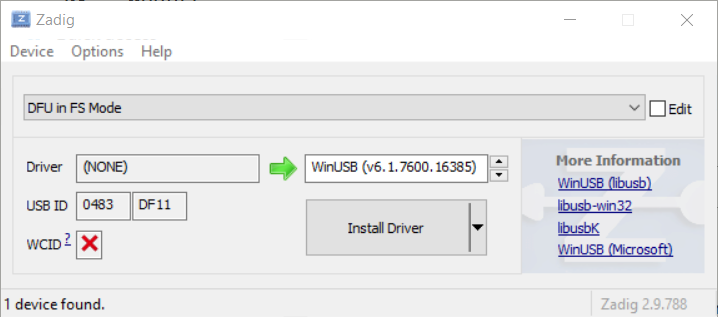 "DFU in FS Mode" on the left, WinUSB on the right.
- Click "Install Driver". (The button reads "Replace Driver" instead if Windows already has a driver for the device — either is fine.) Let it finish; this can take a minute or two — don't unplug the module while it's working. When it reports success, close Zadig. That's the setup done.
Head back to the firmware programmer and start a flash. It will walk you through putting the module into DFU mode and clicking [ CONNECT ]. In the popup that appears, your module should now be listed (as DFU in FS Mode). If it shows up, the driver swap worked and you're ready to flash. You won't need to repeat this setup on this computer again.
Zadig doesn't see my device. Almost always this means the module isn't in DFU mode. Re-do the DFU step — connect over USB, press BOOT and RESET together, release — then look for "DFU in FS Mode" in the dropdown again (turn on Options → List All Devices if it's still not showing). Check the USB cable is a data cable, not charge-only.
I picked the wrong driver and now something else isn't working. Don't worry — the swap only affects the one device you selected in Zadig, and it's fully reversible. Open Windows Device Manager, find the device (look under "Universal Serial Bus devices" for the bootloader, or wherever the affected device now sits), right-click it, choose Uninstall device and tick "delete the driver software" if offered, then unplug and re-plug. Windows reinstalls its default driver. You can then run Zadig again on the correct device.
I'm on a work computer without admin rights. Zadig
needs administrator permission to change a driver, so it won't run on a
locked-down machine. If you can't get admin access, the alternative is
the desktop dfu-util tool with ST's own drivers — but that
route runs outside the browser and isn't something we support here. The
simplest fix is to use a personal computer where you have admin rights.
The technical reason (optional reading)
On Windows, every USB device is bound to a specific driver, and a program can only reach the device through whatever driver it's bound to. Chrome's WebUSB — the technology this programmer uses — can only communicate with devices bound to a generic driver called WinUSB.
When an STM32 chip enters its built-in bootloader (DFU mode), Windows binds it to ST's own STTub30 driver, which WebUSB can't speak to. Zadig simply re-binds that one device to WinUSB instead, which is why Connect starts working afterwards. macOS and Linux don't gate USB access this way, so they need no equivalent step.